Two Tools, One Claude
Anthropic offers two desktop-level tools for working with Claude: Claude Cowork and Claude Code. Both give you access to the same underlying model. Both can read your local files. Both support skills.
But they are built for very different workflows, and choosing the right one — or knowing when to switch between them — can make a significant difference in how productive you are.
This guide breaks down the differences, compares features side by side, and helps you decide which tool fits your work. If you are not familiar with Cowork yet, start with our complete guide to Claude Cowork.
Feature Comparison
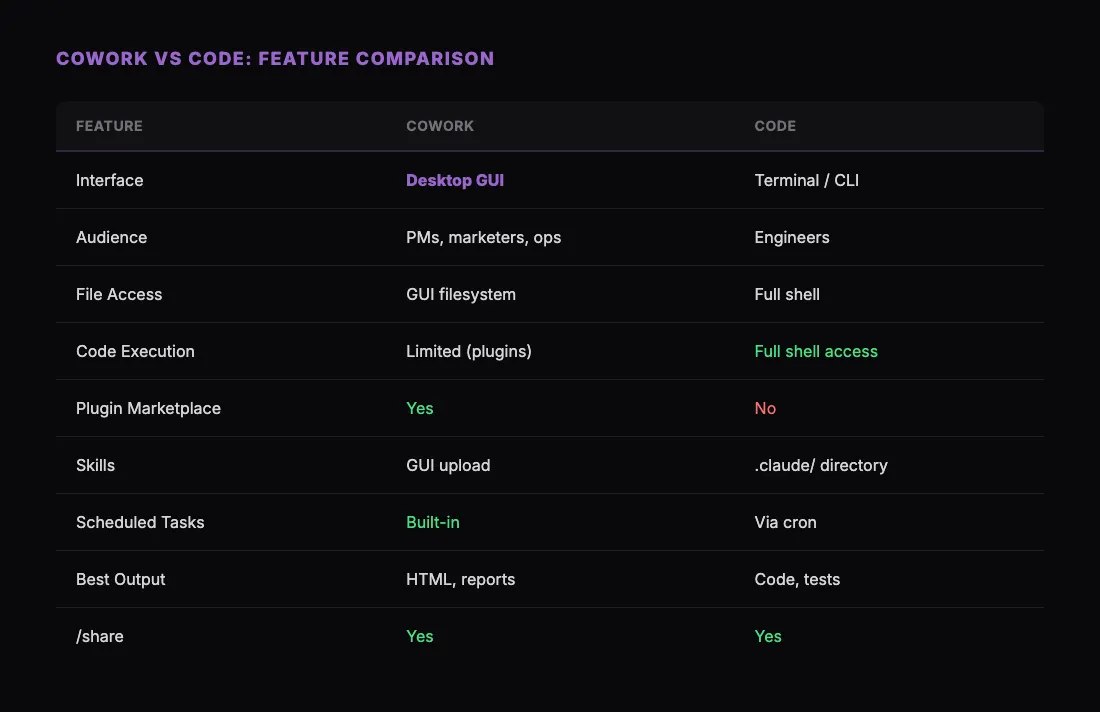
The core difference is the interface paradigm. Cowork is a graphical workspace for broad knowledge work. Code is a terminal agent for software engineering.
When to Use Claude Cowork
Cowork is the right choice when your work is document-centric and tool-connected. Specific scenarios:
Creating and sharing reports. You need a competitive analysis, a quarterly review, or a client-facing dashboard. Cowork lets you generate these as polished HTML and share them instantly using the /share skill from sharable.link. The recipient gets a clean URL — no downloads, no accounts.
Marketing and content workflows. Campaign briefs, email sequences, blog drafts, landing page copy. Cowork's plugin ecosystem connects to the tools marketers already use, and skills automate the repetitive parts of content production.
Sales operations. Account research, call prep, pipeline reviews, outreach drafting. Cowork can pull data from your CRM via plugins, generate the analysis with a skill, and share the output with your team.
Project and operations management. Status reports, vendor reviews, capacity planning, risk assessments. Cowork's scheduled tasks feature means recurring reports generate themselves.
Cross-functional collaboration. When you need to create something and share it with people who are not technical — clients, executives, stakeholders. Cowork produces visual, shareable outputs rather than code.
When to Use Claude Code
Code is the right choice when your work is code-centric and command-line native. Specific scenarios:
Writing and editing code. Code reads your entire codebase, understands file relationships, and can write, refactor, and test code. It operates in the same environment where your code runs.
Debugging and troubleshooting. Code can run commands, check logs, inspect error output, and iterate on fixes. It works inside your shell, which means it has the same access you do.
Git workflows. Committing changes, creating branches, opening pull requests, reviewing diffs. Code handles these natively without switching context.
Infrastructure and DevOps. Deployment scripts, CI/CD configuration, Docker setups, Terraform plans. These are terminal-native tasks.
Test-driven development. Writing tests, running them, analyzing failures, and fixing code. Code's shell access makes this loop fast.
Using Both Together
The most productive setup for technical teams is using both tools. They complement each other naturally:
Build in Code, share with Cowork. An engineer builds a dashboard component in Claude Code. When it is ready for stakeholder review, they use /share to publish it as a live URL. The marketing director opens the link in their browser, no setup needed.
Research in Cowork, implement in Code. A product manager uses Cowork to synthesize user research and write a feature spec. The engineer opens Claude Code, reads the spec, and starts building.
Automate in Cowork, deploy in Code. Operations sets up a scheduled task in Cowork that generates a weekly status report. Engineering uses Code to build the data pipeline that feeds it.
The key insight is that Cowork and Code share the same skill system. A skill like /share works in both environments. You install it differently — GUI upload in Cowork versus placing a file in .claude/skills/ for Code — but the behavior is identical. Learn more about installation in our Claude Skills guide.
How /share Works Across Both
The /share skill from sharable.link is a good example of cross-platform skill compatibility.
In Cowork:
- Ask Claude to generate HTML — a dashboard, report, or interactive tool.
- Type
/share. - Claude publishes it and returns a URL.
- Share the link with anyone.
In Code:
- Claude creates an HTML file in your project directory.
- Type
/share. - Claude reads the file, calls the sharable.link API, and returns a URL.
- Share the link with anyone.
The output is identical. Same URL format, same password protection option, same recipient experience. The difference is only in how you get there — a graphical interface versus a terminal.
This matters because it means teams can standardize on /share as their publishing workflow regardless of which Claude tool individual members prefer. The designer using Cowork and the engineer using Code both produce the same shareable output.
Decision Framework
If you are still unsure which tool to start with, ask yourself these questions:
Do you spend most of your day in a terminal? Use Claude Code. It lives where you already work.
Do you create documents, reports, and presentations more than code? Use Claude Cowork. It is built for that.
Do you need to connect Claude to Slack, Google Workspace, or your CRM? Use Cowork. The plugin marketplace is exclusive to Cowork.
Do you write, test, and deploy code? Use Claude Code. Shell access is non-negotiable for engineering workflows.
Do you do both? Install both. Use Code in your terminal for engineering work and Cowork on your desktop for everything else. Skills like /share work in both, so your workflows stay consistent.
Pricing and Access
Both Cowork and Code are included with Claude Pro, Team, and Enterprise plans. There is no additional cost for either tool. You do not need to choose one — having both installed and switching based on the task is the intended workflow.
Skills are generally free (they are just markdown files). Plugins may be free or paid depending on the provider. The /share skill from sharable.link works on a generous free tier.
Getting Started
If you have not tried either tool yet:
- Start with Cowork if you are a non-engineer. Install the /share skill and publish something in your first session.
- Start with Code if you are an engineer. Install it via your package manager and try it in an existing project.
- Install both if you do cross-functional work. Use Code for your codebase and Cowork for everything else.
The tools are complementary, not competitive. Anthropic built them for different jobs, and the most effective Claude users leverage both. The question is not "which one should I use?" — it is "which one should I use right now?"