Why Skills Matter for Productivity
Claude Cowork is a powerful workspace on its own. But skills are what turn it from a general-purpose assistant into a tool that matches your specific workflow. Each skill you install removes a manual step, automates a repeating task, or gives Claude a capability it did not have before.
The difference between a Cowork setup with no skills and one with the right ten skills installed is dramatic. The first requires you to explain what you want every time. The second lets you type a slash command and get exactly what you need in seconds.
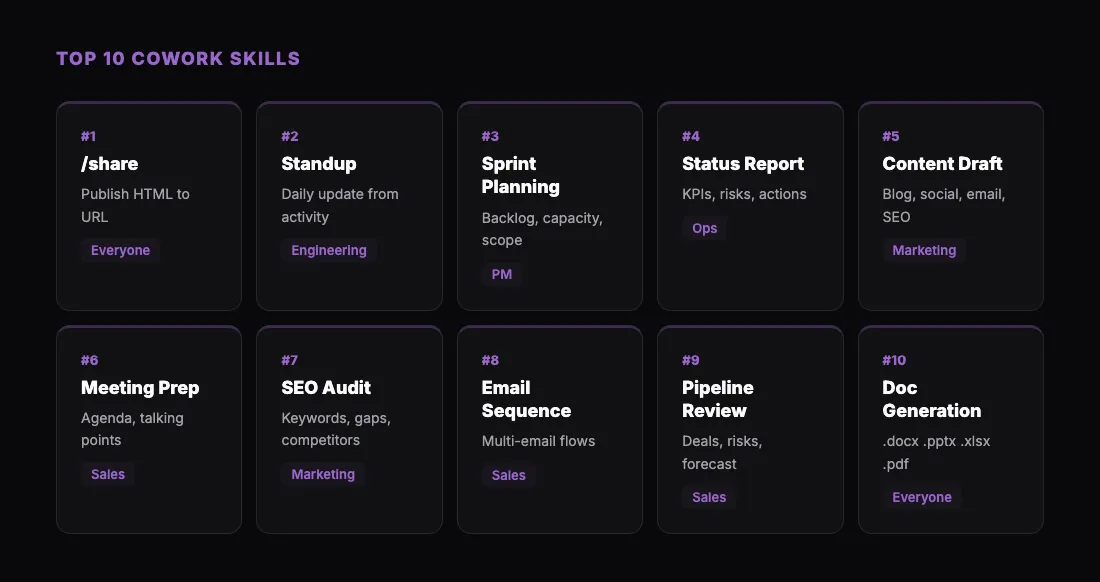
This guide covers the best skills for productivity across roles. Whether you are in marketing, sales, engineering, operations, or leadership, there is a skill set here that will save you hours every week. If you are new to skills entirely, start with our Claude Skills install guide to learn the basics of finding and installing them.
1. /share — Instant Publishing from sharable.link
What it does: Publishes any HTML file Claude creates to a public URL at sharable.link. One command, one link, anyone can view it.
Why it is essential: Every workflow in Cowork eventually produces an output that needs to be shared — a dashboard, a report, a landing page draft, a presentation, an interactive tool. Without /share, you are stuck screenshotting, emailing files, or deploying to a hosting service. With /share, you type one command and get a clean link.
Use cases:
- Share a competitive analysis dashboard with your team
- Send a client a password-protected report
- Publish an interactive calculator for stakeholder review
- Distribute a landing page draft for feedback before it goes live
How to install: Download the skill from sharable.link/install, then upload it in Cowork under Customize, Skills, +, Create skill.
Pro tip: Combine /share with password protection for sensitive outputs. Just say "share this with a password" and Claude prompts you to set one. The recipient enters the password before the content loads — no accounts needed.
The /share skill is the single highest-impact skill you can install because it applies to every workflow that produces visual output. Install it first.
2. Standup Generator
What it does: Generates a daily standup update based on your recent activity — commits, messages, completed tasks, and calendar events.
Why it matters: Writing standups is a daily tax. It takes 5-10 minutes to remember what you did, format it, and post it. The standup skill does it in seconds by pulling from your connected tools (Git, Slack, calendar) and formatting the update into a clean yesterday/today/blockers structure.
Use cases:
- Generate your personal standup every morning
- Compile team standups into a summary for leadership
- Keep a running log of daily work for performance reviews
Pro tip: Pair this with a scheduled task to have Claude generate your standup automatically at 9 AM and post it to your team's Slack channel.
3. Sprint Planning
What it does: Facilitates sprint planning by analyzing your backlog, estimating capacity based on team availability, and recommending what to include in the upcoming sprint.
Why it matters: Sprint planning meetings often run long because the preparation is inadequate. This skill front-loads the analysis so the meeting itself is a discussion, not a discovery exercise.
Use cases:
- Scope a two-week sprint against team capacity
- Identify which P0 items fit and what becomes stretch
- Handle carryover items from the previous sprint
- Account for PTO and meeting overhead in capacity calculations
Pro tip: Run this skill the day before your sprint planning meeting. Share the output with your team using /share so everyone reviews it asynchronously before the meeting starts.
4. Status Report Generator
What it does: Creates structured status reports with KPIs, progress updates, risks, and action items. Formats the output for different audiences — executive summary, team detail, or client update.
Why it matters: Status reports are essential but time-consuming. This skill pulls together project context, recent activity, and metrics into a formatted report you can send to stakeholders in minutes instead of hours.
Use cases:
- Weekly team status for leadership
- Client project updates with green/yellow/red status indicators
- Monthly operational reviews with trend analysis
- Board-level summaries that highlight decisions needed
Pro tip: Set up a recurring scheduled task that generates your weekly status report every Friday at 3 PM. Use /share to publish it and send the link to stakeholders.
5. Content Drafting
What it does: Drafts marketing content across channels — blog posts, social media, email newsletters, landing pages, and case studies — with channel-specific formatting and SEO recommendations.
Why it matters: Content creation is time-intensive. This skill handles the heavy lifting of first drafts, structure, and formatting so you can focus on refinement and strategy.
Use cases:
- Draft a blog post from an outline or topic
- Generate social media copy for a product launch across platforms
- Write email newsletter content with subject line options
- Create a landing page draft with conversion-focused copy
Pro tip: After drafting a landing page, use /share to publish it for team review. Stakeholders can see the actual rendered page, not just the raw text.
6. Meeting Prep
What it does: Prepares you for meetings by pulling calendar context, attendee information, relevant documents, and recent communications. Generates a briefing with suggested agenda items and talking points.
Why it matters: Walking into a meeting cold wastes everyone's time. This skill ensures you are prepared with context, background on attendees, and a clear agenda — even for meetings you forgot about.
Use cases:
- Prep for a client call with account history and open items
- Get briefed on a new prospect before a sales meeting
- Review relevant documents before a project review
- Generate an agenda for a recurring team meeting
Pro tip: Combine with the calendar plugin to have Claude automatically prep you for every meeting 15 minutes before it starts.
7. SEO Audit
What it does: Runs a comprehensive SEO audit covering keyword research, on-page analysis, content gaps, technical checks, and competitor comparison.
Why it matters: SEO audits are typically expensive (consulting) or tedious (doing it manually). This skill automates the analysis and presents findings in a structured, actionable format.
Use cases:
- Audit your site's SEO health quarterly
- Find keyword opportunities competitors are ranking for
- Identify content gaps in your topic coverage
- Check technical SEO issues like crawlability and meta data
Pro tip: After running the audit, use /share to publish the results as an interactive HTML report. Much easier for the team to navigate than a spreadsheet.
8. Email Sequence Builder
What it does: Designs multi-email sequences with full copy, timing, branching logic, and performance benchmarks. Covers onboarding flows, lead nurture campaigns, re-engagement sequences, and more.
Why it matters: Email sequences require both strategic thinking (timing, branching, goals) and creative execution (subject lines, body copy, CTAs). This skill handles both, giving you a ready-to-implement sequence.
Use cases:
- Build an onboarding email series for new users
- Create a lead nurture drip campaign with branching paths
- Design a re-engagement sequence for lapsed customers
- Draft a product launch email series with countdown timing
Pro tip: Publish the entire sequence as a visual HTML flowchart using /share so your team can review the logic and copy together.
9. Pipeline Review
What it does: Analyzes your sales pipeline — prioritizes deals, flags risks, identifies stale opportunities, and generates a weekly action plan.
Why it matters: Pipeline hygiene is the difference between accurate forecasting and missed quarters. This skill surfaces the deals that need attention and the patterns that signal trouble.
Use cases:
- Weekly deal prioritization for sales reps
- Risk flagging for deals with no recent activity
- Close date accuracy auditing
- Revenue forecasting with best/likely/worst scenarios
Pro tip: Pair with your CRM plugin to pull live pipeline data. Run the review weekly and share results with your sales leadership using /share.
10. Document Generation (Word, PowerPoint, PDF)
What it does: Creates formatted documents in the file types your stakeholders actually use — .docx, .pptx, .xlsx, and .pdf.
Why it matters: Claude produces excellent content, but it usually lives inside the chat. Document generation skills turn that content into files you can attach, distribute, and present in professional settings.
Use cases:
- Generate a client proposal as a formatted Word document
- Create a board presentation as a PowerPoint deck
- Produce a financial summary as a formatted spreadsheet
- Export a compliance report as a PDF
Pro tip: For documents that need to be viewed but not edited, publish them as HTML using /share instead. It is faster, requires no file downloads, and the formatting renders perfectly across devices.
How to Build Your Skill Stack
Do not install all ten skills at once. Start with the ones that match your daily workflow and expand from there.
If you are in marketing: Start with /share, content drafting, SEO audit, and email sequence builder.
If you are in sales: Start with /share, pipeline review, meeting prep, and standup generator.
If you are in engineering: Start with /share, standup generator, sprint planning, and status report generator.
If you are in operations or leadership: Start with /share, status report generator, meeting prep, and pipeline review.
Notice that /share appears in every stack. It is the universal output skill — no matter what Claude creates, you need a way to get it in front of the right people.
Getting Started
- Install the
/shareskill from sharable.link/install — it takes 30 seconds and applies to every workflow.
- Pick two more skills from this list based on your role.
- Use them daily for a week. Notice what manual work disappears.
- Add more skills as you identify gaps in your workflow.
- Consider writing your own skills for workflows unique to your team.
The right skill stack turns Claude Cowork from a helpful assistant into a system that runs alongside your entire workday. Start small, build up, and let the time savings compound.