Why Proposals Take Too Long
You had a great discovery call. The prospect is interested. Now you need to send a proposal before the momentum fades. But building a proper proposal means opening a template, customizing every section, formatting the pricing table, checking the timeline, and exporting it as a PDF that might break on someone else's screen.
By the time you send it, two days have passed and the prospect's excitement has cooled.
Claude builds the entire proposal in a single conversation. You describe the project, paste in the details, and get a polished, professional document that you share as a link. The prospect clicks, reads, and decides. No downloads. No formatting issues. No delays.
The Proposal Prompt Template
Here is a complete prompt you can copy and adapt for any client proposal. Replace the bracketed sections with your actual project details:
"Create a professional project proposal as a polished HTML page.
>
Client: [Client company name]
Project: [Brief project description]
Prepared by: [Your name / Your company]
Date: [Date]
>
Include these sections in order:
>
1. Cover section with the project title, client name, your company name, and date
2. Executive Summary — 3-4 sentences describing the project, the problem it solves, and the expected outcome
3. Project Understanding — demonstrate that you understand the client's situation and goals based on the discovery call. Reference specific things they mentioned: [list 2-3 specific pain points or goals from your conversation]
4. Proposed Approach — describe how you will execute the project in clear phases. Phases: [list your phases, e.g., Discovery, Design, Development, QA, Launch]
5. Timeline — visual timeline showing each phase with start and end dates. Total project duration: [X weeks/months]
6. Deliverables — bulleted list of everything the client receives
7. Pricing — three tiers in a comparison table:
- Starter: $[X] — includes [scope]
- Professional: $[Y] — includes [scope] (mark this as recommended)
- Enterprise: $[Z] — includes [scope]
8. Team — brief bios of key team members who will work on the project
9. Terms — payment schedule, revision policy, and timeline assumptions
10. Next Steps — clear call to action for how to proceed
>
Design: clean, confident, professional. Use [your brand colors or 'navy and white']. Make it feel like a proposal from a firm that does excellent work."
That single prompt produces a complete proposal. The output will have proper formatting, styled pricing tables, a visual timeline, and a professional layout.
Reviewing the First Draft
Claude's first output will be structurally complete but will need refinement. Here is what to look for:
Pricing accuracy. Double-check every number. Claude may round or adjust numbers from your input. Verify the pricing tiers match exactly what you intend to offer.
Project understanding tone. This section needs to sound like it came from someone who listened carefully during the discovery call. If it reads generic, add more specific details:
"In the project understanding section, mention that they specifically said their current onboarding flow has a 40% drop-off rate and they want to get it under 20%. Also reference their concern about the timeline overlapping with their Q3 product launch."
Timeline feasibility. Make sure the dates and durations are realistic. Claude will generate a timeline based on what you provide, but it will not push back if your timeline is unrealistic.
Scope boundaries. Read the deliverables section carefully. Make sure it clearly states what is included and, just as importantly, what is not included. Ambiguity in proposals leads to scope creep later.
Iterating to a Final Version
The iteration phase is where the proposal goes from good to great. Here are the most common adjustments:
Tighten the executive summary:
"Make the executive summary more direct. Lead with the business outcome, not the project description. The first sentence should tell the client what they gain."
Refine the pricing presentation:
"In the pricing table, add a 'most popular' badge to the Professional tier. Include a brief note under each tier explaining who it is best for. Add a note that pricing is valid for 30 days."
Improve the timeline visual:
"Make the timeline a horizontal Gantt-style chart with colored bars for each phase. Show phase overlaps where Discovery and Design run in parallel during week 2."
Add social proof:
"After the team section, add a 'Selected Work' section with 3 brief case studies. Each should have: client industry, project type, key result. Keep each to 2-3 sentences."
Polish the design:
"Add more whitespace between sections. Make the cover section taller with centered text. Use a subtle gradient background on the pricing table."
Three to four rounds of iteration typically produce a proposal that looks like it was designed by a professional team.
Password-Protect and Share
Proposals contain pricing, strategy, and scope details that you do not want publicly accessible. Always password-protect before sharing:
"/share with password [proposal-password]"
You get a URL like sharable.link/a1b2c3d4. Send the link in your follow-up email and the password in a separate message.
For more on how password protection works, see how to password-protect your shared pages.
The follow-up email structure:
Subject: [Project Name] Proposal — [Client Name]
>
Hi [Name],
>
Great speaking with you on [day]. Here is the proposal we discussed:
[sharable.link URL]
>
I will send the access password separately.
>
The proposal includes three scope options. I would recommend the Professional tier based on what we discussed, but I am happy to walk through the differences.
>
Available for a follow-up call this week if you have questions.
>
[Your name]
Send the password via Slack, text, or a second email. Separating the link and password adds a layer of security and demonstrates professionalism.
Customizing for Different Proposal Types
The template above works for service proposals, but you can adapt it for other scenarios.
Software implementation proposals:
Replace the "Proposed Approach" section with an implementation methodology. Add sections for technical requirements, integration points, and a post-launch support plan.
Retainer proposals:
Replace the one-time pricing table with monthly retainer tiers. Add a section showing what a typical month includes (hours, deliverables, meetings). Include a ramp-up and ramp-down provision.
Partnership proposals:
Replace pricing with a partnership structure. Add sections for mutual commitments, success metrics, and a proposed pilot period.
For each variation, adjust the prompt template and save it. Over time you build a library of proposal prompts that cover every type of business you pursue.
The Speed Advantage
In competitive deals, the agency that sends the proposal first often wins. Not because the proposal is better, but because the prospect's attention is still engaged.
With Claude, you can send a polished proposal the same day as the discovery call. That responsiveness signals competence and urgency. The prospect remembers the conversation, the proposal references specific things they said, and they can share it with their team while the need is still top of mind.
Compare that to the agency that sends a proposal four days later in a PDF that requires downloading and opening in a specific application.
If you are running an agency and want to see how this fits into a broader delivery workflow, read how agencies use Claude to deliver client work faster.
A Real Workflow Example
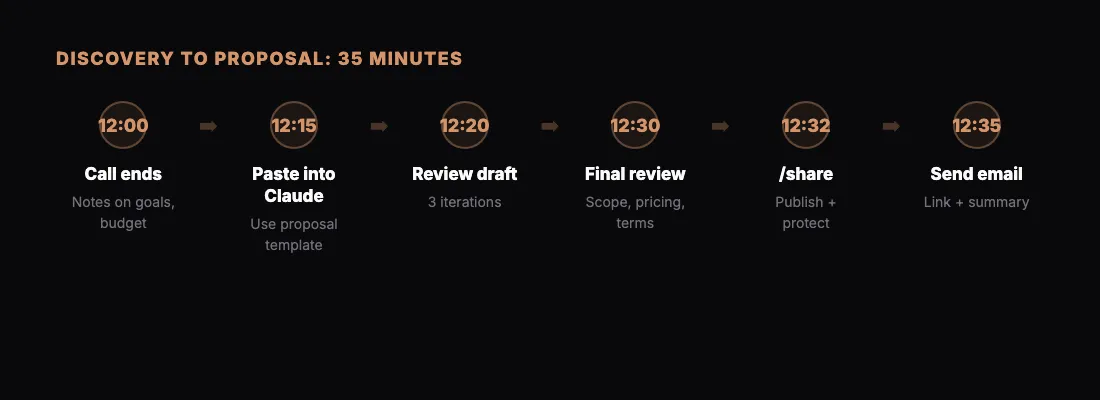
Here is what the full process looks like in practice:
- 12:00 PM — Discovery call ends. You have notes on the client's goals, pain points, and budget range.
- 12:15 PM — Open Claude. Paste your notes into the proposal prompt template. Hit send.
- 12:20 PM — Review the first draft. Make three iteration requests.
- 12:30 PM — Final review. Everything looks good.
- 12:32 PM — Run
/share with passwordto publish and protect the proposal. - 12:35 PM — Send the follow-up email with the link.
Thirty-five minutes from end of call to proposal delivered. That is the pace that wins deals.
Start With Your Next Proposal
Copy the prompt template above. Fill in the brackets with a real prospect. Run it through Claude. Share the result.
You will not go back to building proposals manually once you see how fast this is.