The Full Picture
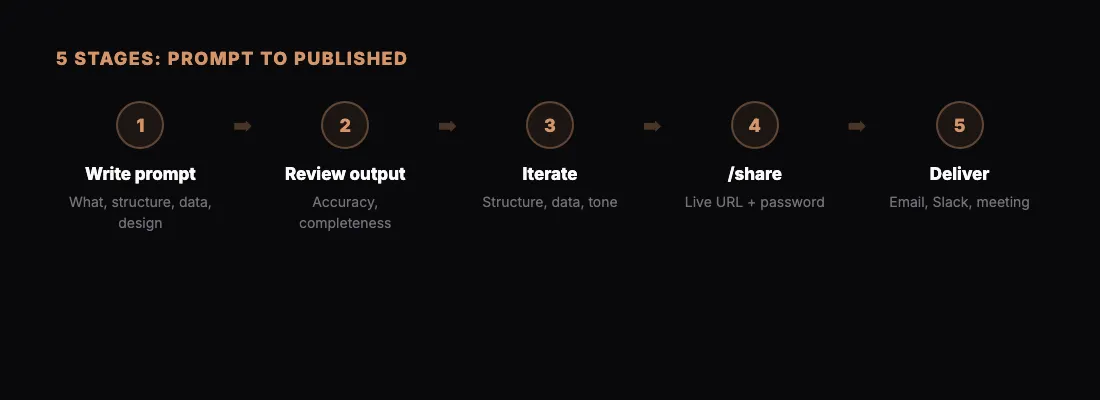
Most guides show you individual pieces: how to prompt Claude, how to share a page, how to add a password. This guide connects all of those pieces into one end-to-end workflow, from the moment you have an idea to the moment someone else is viewing your published page.
Whether you are building a report, a dashboard, a landing page, or a proposal, the workflow follows the same five stages: write the prompt, review the output, iterate, share, and deliver.
Stage 1: Write the Prompt
The quality of your output depends almost entirely on the quality of your prompt. A vague prompt gets a generic result. A specific prompt gets something you can actually use.
Here is what a good prompt includes:
What you are building:
"Create an HTML page that serves as a quarterly business review for my SaaS company."
The structure:
"Include sections for: revenue summary, churn analysis, feature adoption metrics, support ticket trends, and strategic priorities for next quarter."
The data:
"Here are the numbers: [paste your data, spreadsheet export, or bullet points]."
The design direction:
"Use a clean, modern layout. Navy blue and white color scheme. Sans-serif fonts. Include charts where appropriate."
Put it all together into one prompt. The more context Claude has in a single message, the more cohesive the result. You do not need to drip-feed instructions across multiple messages.
A complete first prompt might look like this:
"Create a quarterly business review as a polished HTML page. Company: [name]. Quarter: Q1 2026.
>
Sections: executive summary (3 bullet max), revenue metrics with MoM comparison, churn analysis by cohort, top 5 features by adoption rate, support ticket volume and resolution time, and strategic priorities for Q2.
>
Data: [paste everything]
>
Design: clean and professional. Dark sidebar with white content area. Use charts for revenue and churn trends. Tables for feature adoption and support metrics. Make it look like something you would present to a board."
Stage 2: Review the Output
Claude generates the full HTML page. Before you share anything, review it carefully. Open it in Claude's preview if available, or read through the HTML structure.
Check these things:
- Accuracy. Are the numbers correct? Did Claude interpret your data right?
- Completeness. Are all the sections you asked for present?
- Readability. Can someone unfamiliar with the context understand the key points?
- Design. Does it look polished enough for your audience?
Do not expect perfection on the first pass. The first output is a strong draft. The next stage is where it becomes a finished deliverable.
Stage 3: Iterate
This is where Claude shines over traditional tools. Iteration is conversational, not mechanical. You do not need to click through menus, resize elements, or fight with formatting. You just say what you want changed.
Common iteration requests:
Structural changes:
"Move the executive summary above the revenue section. Remove the support ticket section entirely. Add a competitive positioning section after churn analysis."
Data adjustments:
"The Q4 revenue number should be $1.2M not $1.1M. Update the chart and the summary."
Design refinements:
"Make the section headers larger. Add more whitespace between sections. The charts feel cramped — give them more room."
Tone and narrative:
"The executive summary is too dry. Make it more confident. We had a strong quarter and the summary should reflect that."
Adding interactivity:
"Add a table of contents at the top with anchor links to each section. Make the tables sortable."
Each iteration takes seconds. You can go through five or six rounds of changes in under ten minutes and end up with something that would have taken hours to build in a traditional design tool or slide editor.
Stage 4: Share
When the page is ready, publish it with a single command:
"/share"
Claude pushes the HTML to sharable.link and returns a URL. The page is now live and accessible to anyone with the link.
Password Protection
For sensitive content, add a password before sharing:
"/share with password boardroom2026"
Recipients see a clean password prompt when they open the link. They enter the password and the content loads. No accounts needed, no sign-ups required. For a deeper look at how this works, see how to password-protect your shared pages.
Updating a Shared Page
If you need to make changes after sharing, make your edits in Claude and run /share again. You will get a new URL with the updated content.
Stage 5: Deliver
Sharing is publishing. Delivering is getting the link to the right people with the right context.
Email delivery:
Include the link in a brief email. Add one or two sentences of context so the recipient knows what they are looking at before they click.
Slack or Teams delivery:
Drop the link in the relevant channel. sharable.link URLs generate clean previews in most messaging tools.
Presentation contexts:
If you are presenting the page live, open it in your browser and share your screen. The page is designed for screen viewing, so it looks good at any size.
Multi-stakeholder delivery:
For documents that need to reach several people, send the link once. Everyone accesses the same URL. No version confusion. No "which attachment is the latest?" messages.
If the content is password-protected, send the password through a different channel than the link. Link in email, password in Slack, for example.
Workflow Variations
The five stages above apply to every type of deliverable, but the prompts change based on what you are building.
For client reports:
Focus your prompt on data visualization and executive summaries. Clients want to see the numbers and understand the takeaways quickly. See the full client reporting workflow for specifics.
For proposals:
Emphasize structure, pricing clarity, and professional tone. A proposal needs to sell, not just inform.
For dashboards:
Prioritize interactivity and data density. Dashboards should surface key metrics at a glance with the ability to dig deeper.
For internal docs:
You can relax the design requirements and focus on clarity and completeness. Internal audiences care more about substance than polish.
Advanced Tips
Build a Prompt Library
After a few weeks of using this workflow, you will have prompts that produce consistently good results. Save them. Organize them by deliverable type. A prompt library turns a 10-minute process into a 5-minute process because you skip the "how should I structure this prompt" step entirely.
Use Claude's Memory
If you are working on the same type of deliverable regularly, Claude remembers your preferences within a conversation. Start a dedicated conversation for each recurring deliverable type and build on it over time.
Batch Your Deliverables
If you have multiple pages to create, do them in sequence within the same session. Your prompting improves as you go, and you develop a rhythm that makes each subsequent page faster.
Install the Skill
If you are using Claude Code, you can install the sharable.link skill to streamline the process. The skill handles authentication and publishing in a single step. For setup instructions, see the skill installation guide.
Start With One Page
Do not try to overhaul your entire content workflow at once. Pick one deliverable that is due this week. Build it with Claude. Share it with /share. Send the link.
That single experience will show you how much faster this workflow is compared to whatever you are doing today. From there, it expands naturally to every other deliverable you produce.
The full loop takes about 15 minutes the first time and gets faster every time after that.