You Built Something. Now What?
You have an HTML file sitting on your computer. Maybe you coded it yourself. Maybe an AI assistant generated it. Maybe you exported a report from a tool. The file looks great when you open it locally, but you need other people to see it too.
The traditional path — buy a domain, set up hosting, configure DNS, upload via FTP — is absurd overkill for a single HTML file. You need a URL, not a DevOps degree.
Here are five ways to host an HTML file online for free in 2026, ranked from most setup to least.
Option 1: GitHub Pages
GitHub Pages turns any repository into a static website. It is free for public repos and supports custom domains.
How it works:
- Create a GitHub account (if you don't have one).
- Create a new repository.
- Upload your HTML file as
index.html. - Go to Settings > Pages and select the branch.
- Wait 1-2 minutes for deployment.
- Your file is live at
username.github.io/repo-name.
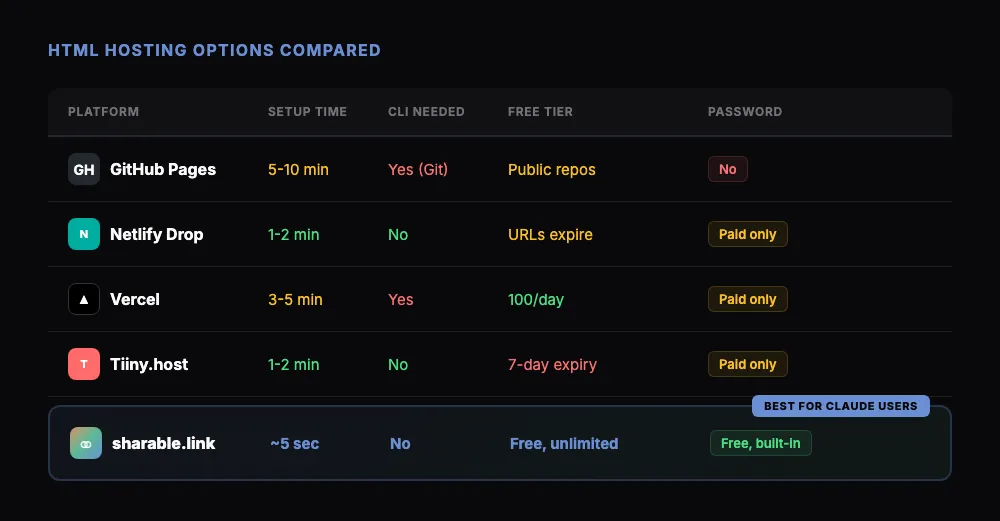
Best for: Developers who already use GitHub and want version control. Not ideal if you just want to share a quick file — the setup takes several minutes even if you know what you're doing.
Limitations: Public repos only (for free tier), no password protection, files must be committed to a Git repository.
Option 2: Netlify Drop
Netlify Drop is the drag-and-drop deployment tool from Netlify. You literally drag a folder onto a web page and get a live URL.
How it works:
- Go to app.netlify.com/drop.
- Drag your HTML file (or a folder containing it) onto the page.
- Get a random URL like
random-name-123.netlify.app.
Best for: Quick one-off deployments when you don't need to update the file later. The interface is clean and requires no account for temporary deploys.
Limitations: Temporary deploys expire. To keep the URL alive, you need a free Netlify account. No built-in password protection on the free tier.
Option 3: Vercel
Vercel is built for frontend frameworks, but it handles plain HTML files too. If you're already in the Vercel ecosystem, it's a natural choice.
How it works:
- Create a Vercel account.
- Install the Vercel CLI:
npm i -g vercel. - Run
vercelin the directory containing your HTML file. - Follow the prompts.
- Get a URL like
your-project.vercel.app.
Best for: Developers who want fast global CDN delivery and already use Vercel for other projects.
Limitations: Requires Node.js and the Vercel CLI (or GitHub integration). More tooling than you need for a single file.
Option 4: Tiiny.host
Tiiny.host is built specifically for hosting single HTML files and small sites. Upload a file, get a link.
How it works:
- Go to tiiny.host.
- Upload your HTML file.
- Choose a subdomain.
- Get a URL like
your-name.tiiny.site.
Best for: Non-technical users who want the simplest browser-based upload experience.
Limitations: Free tier has a 1-site limit and pages expire after 7 days. Paid plans start at $6/month for permanent hosting.
Option 5: sharable.link (For Claude Users)
If you're working inside Claude — whether in Claude Code or Claude Cowork — you already have the fastest path to a live URL. The /share command publishes any HTML file Claude creates and returns a public link in seconds.
How it works:
- Ask Claude to create something: "Build me an interactive chart comparing Q1 revenue by region."
- Claude generates the HTML.
- Type
/share. - Get a link like
sharable.link/a1b2c3d4.
That's it. No accounts to create, no CLI to install, no drag-and-drop interface to navigate. The entire flow happens inside your Claude conversation.
Best for: Anyone using Claude who needs to share AI-generated HTML — dashboards, reports, landing pages, interactive tools, or prototypes.
Bonus: You can add password protection by saying "share this with a password." The recipient sees a clean password form before the content loads.
Quick Comparison
Which One Should You Pick?
The answer depends on where your HTML file came from and what you need.
If you're a developer managing a portfolio of static sites, GitHub Pages or Vercel gives you version control and CI/CD pipelines. That infrastructure pays off over time.
If you need a quick one-off deploy of a file you built yourself, Netlify Drop or Tiiny.host gets you there fastest from a browser.
If Claude built the file, sharable.link is the obvious choice. The /share command lives inside the conversation where the file was created. There's no context switch — no downloading, no uploading, no separate tool. You go from creation to shared URL in one step.
Most people reading this article are probably in that third category. You asked Claude to build something, it generated HTML, and now you need a link to send. That's exactly the workflow sharable.link was designed for.
What About Self-Contained HTML?
One thing worth noting: Claude typically generates self-contained HTML files. All the CSS is inline, all the JavaScript is embedded, and there are no external dependencies that could break. This means any of the hosting options above will work — but it also means you don't need the build pipelines and asset management that platforms like Vercel and Netlify are designed for.
A single HTML file doesn't need a deployment pipeline. It needs a URL. Pick the tool that gives you one fastest.
Get Started
If you're working with Claude and want the fastest way to host and share HTML files, install the sharable.link skill:
- Download SKILL.md from sharable.link.
- In Claude: Customize → Skills → + → Create skill → Upload a skill.
- Create something with Claude.
- Type
/share.
Your file is live. No hosting setup required. Check out our guide on what Claude Artifacts are or learn about other free HTML hosting approaches for a deeper comparison.