What Is a Claude Artifact?
When you ask Claude to build something visual — a dashboard, a calculator, a styled report — it doesn't just describe what it would look like. It creates the thing. The actual, working HTML. This output is called an artifact.
Artifacts are self-contained HTML documents that Claude generates during a conversation. They can include CSS for styling, JavaScript for interactivity, charts rendered with libraries like Chart.js or D3, form elements that respond to user input, and layouts that look polished enough to present to a client.
Unlike plain text responses, artifacts are meant to be seen and used, not just read.
What Can Artifacts Do?
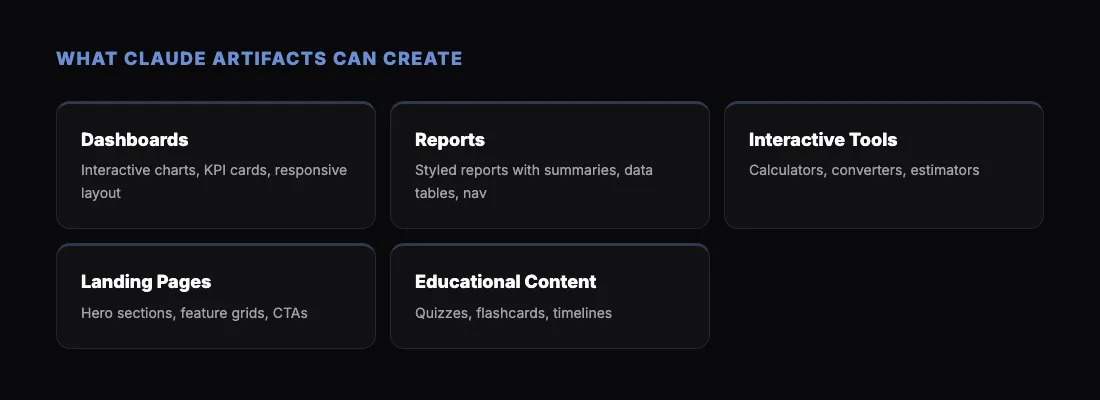
The range is wider than most people expect. Here are real examples of what Claude builds as artifacts:
Dashboards and data visualization. Ask Claude to "create a dashboard showing monthly revenue, customer acquisition cost, and churn rate for the last 12 months" and it will produce a complete page with interactive charts, summary cards, and responsive layout. Provide your own data or let Claude generate sample data to establish the structure.
Reports and presentations. Claude can generate styled reports with executive summaries, data tables, charts, and section navigation. These aren't plain documents — they're designed HTML pages with typography, color, and layout. Try: "Create a quarterly business review report with sections for revenue, growth metrics, and strategic initiatives."
Interactive tools. Calculators, converters, estimators, and scoring tools. Example prompt: "Build a SaaS pricing calculator that lets users pick a plan tier, add seats, and see monthly and annual costs." Claude will create a working tool with sliders, dropdowns, and real-time price updates.
Landing pages and prototypes. Need to mock up a landing page concept? Claude can produce a fully styled page with hero section, features grid, testimonial cards, and a call-to-action. Useful for quick design reviews before committing to a full build.
Educational content. Interactive quizzes, flashcard systems, timelines, and explainer pages. Claude can build a complete learning module as a single HTML file.
The Sharing Problem
Here's where things get frustrating. Claude creates impressive artifacts, but sharing them is awkward.
In Claude.ai (the web app), artifacts render in a preview panel. You can see them, interact with them, and iterate on them. But if you want someone else to see your artifact, your options are limited:
- Screenshot it. You lose interactivity, and the recipient can't click, scroll, or explore.
- Copy the HTML and email it. The recipient has to save it as a file and open it in their browser. Most non-technical people won't do this.
- Deploy it somewhere. You could push the HTML to GitHub Pages, Netlify, or another host. But that's a lot of steps for something Claude generated in 10 seconds.
In Claude Code and Claude Cowork, the situation is similar. Claude generates an HTML file on your machine. You can open it in your own browser, but getting it to someone else means dealing with file transfers or deployment.
The artifact is valuable. The sharing workflow is not.
How /share Solves This
The sharable.link /share command exists to close this gap. After Claude creates an artifact, you type /share and get a public URL in seconds.
Here is the workflow:
- Ask Claude to build something. Use any prompt that results in an HTML artifact — a dashboard, a report, a tool, a page.
- Type
/share. Claude reads the HTML file it just created, uploads it to sharable.link, and returns a URL.
- Send the link. The recipient opens it in any browser. No downloads, no accounts, no file management.
The URL looks like sharable.link/a1b2c3d4. The page loads instantly. All the interactivity — charts, forms, animations — works exactly as it did in your local preview.
Password Protection
If the artifact contains sensitive information — financial data, internal metrics, client details — you can protect it. Say "share this with a password" and Claude will ask you to set one.
When the recipient opens the link, they see a clean password prompt. After entering the correct password, the content loads. No sign-up forms, no account creation, just one password field.
Example Prompts to Try
If you want to see the full workflow — artifact creation followed by instant sharing — try these prompts with Claude:
For a dashboard:
"Create a project management dashboard showing task completion rates, team velocity, and upcoming deadlines. Use sample data for a 6-person engineering team."
For a report:
"Generate a competitive analysis report for the email marketing SaaS space. Include market size, key players, feature comparison table, and a summary of trends."
For a tool:
"Build a mortgage calculator that lets users input loan amount, interest rate, and term length, and shows monthly payment, total interest, and an amortization schedule."
For a presentation page:
"Create a one-page project proposal for a mobile app redesign. Include problem statement, proposed solution, timeline, and budget estimate."
After Claude generates any of these, type /share to publish it instantly.
Artifacts vs. Regular Responses
It helps to understand when Claude creates an artifact versus a plain text response.
Claude generates an artifact when:
- You ask for something visual (dashboard, chart, page, tool).
- You ask for something interactive (calculator, form, quiz).
- You ask for something that benefits from layout and design (report, proposal, presentation).
Claude gives a text response when:
- You ask a question that has a text answer.
- You ask for code that's meant to be used in a larger project (not standalone HTML).
- You ask for advice, analysis, or explanation.
If you're not sure whether Claude will produce an artifact, just ask for it explicitly: "Create this as a standalone HTML page."
Why Self-Contained HTML Matters
Claude's artifacts are self-contained. All CSS is inline or embedded in a